

Reviewed by the SAP PRESS editorial team.
SAP Analytics Cloud (SAC) is an all-in-one SaaS solution for business intelligence (BI), planning, predictive analytics, and application development. Built on SAP Business Technology Platform, it enables centralized, real-time analytics and decision-making for organizations across industries. SAP Analytics Cloud is used by BI analysts, financial planning and analysis teams, and developers.
Table of Contents
SAP has long been a part of the BI space, providing a handful of different solutions that were developed in house (such as SAP Lumira, SAP Predictive Analytics, and SAP Business Planning and Consolidation) and acquired in the first two decades of the 2000s (such as BusinessObjects). These solutions are considered part of the on-premise, “legacy,” SAP ERP suite of products available to businesses.
When the new SAP S/4HANA suite was released in 2015, a new BI product called SAP Cloud for Analytics was released as well. This provided a single analytics hub for customers, introduced a new user interface, and allowed businesses to utilize the data processing capabilities of the new, SAP HANA in-memory database. In 2016 it was renamed to SAP BusinessObjects Cloud and again in 2017 to SAP Analytics Cloud.
Currently, the solution has four core areas of functionality: business intelligence, planning, predictive analytics, and an application development tool known as analytics designer. One important new functionality released this decade is the "unified story experience" that was released in 2023. This allows users to create dashboards and analytics apps in one spot, rather than having to decide ahead of time which to create.
SAP Analytics Cloud has continued to evolve since the unified story experience was introduced in 2023. Joule, SAP's AI copilot, has been integrated into SAP Analytics Cloud, allowing business users to ask analytical questions in natural language and receive answers as charts and metrics without navigating the interface directly. Planning capabilities have been further enhanced with tighter integration between SAP Analytics Cloud and SAP Datasphere, enabling planning data to be stored and analyzed directly in SAP Datasphere without duplication. Additional improvements have been delivered across predictive analytics, dashboard performance, and live connectivity options, including support for Google BigQuery as a live data source.
As the solution continues to mature, SAP Analytics Cloud will become the primary BI solution for SAP customers and may result in the sunsetting of the existing legacy solutions.
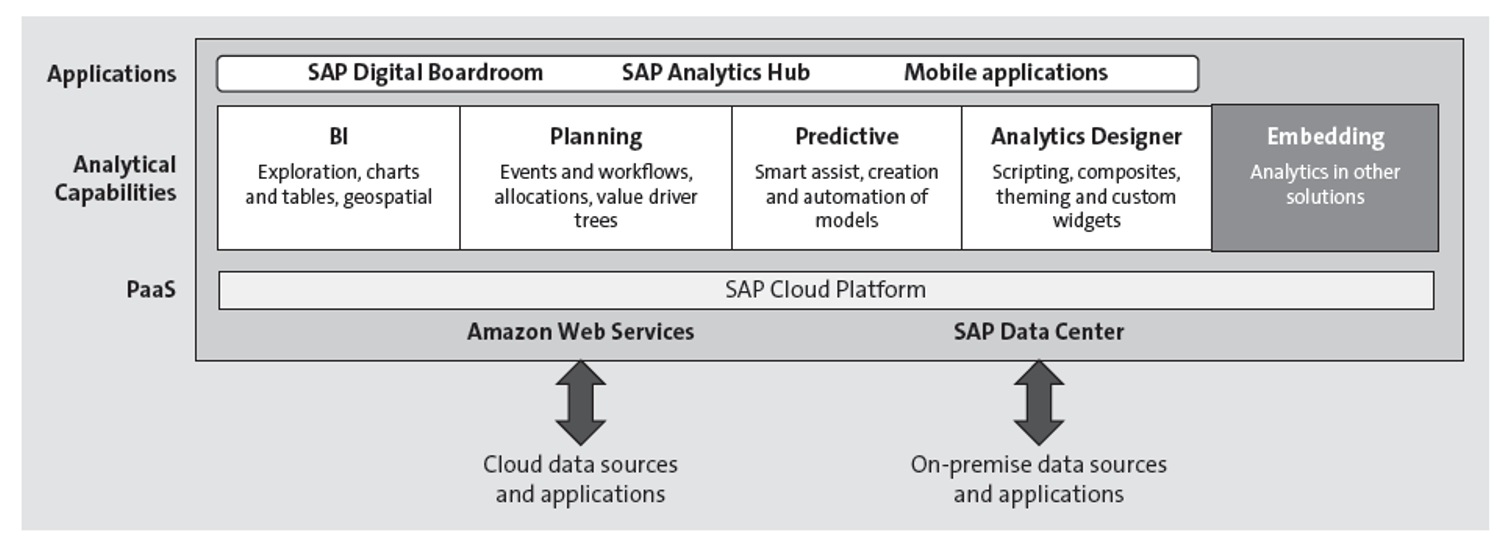
Like SAP S/4HANA, the largest difference between SAP Analytics Cloud and its predecessors comes in the form of simplification. Where analysts formerly worked between multiple solutions to complete their data visualization, reporting, predictive, and other BI tasks, SAP Analytics Cloud provides them with the opportunity to perform all of these tasks in a single solution.
In terms of individual processes, SAP Analytics Cloud brings about improvements in numerous ways. A live connection to an SAP HANA database makes data processing much faster than what analysts are used to. An SAP Fiori-inspired user interface, built around five core design guidelines, makes navigating through the solution easy for all. Lastly, SAP Analytics Cloud was created with a self-service approach in mind, meaning users can easily and readily create reports and perform other data analysis that can be used to make smarter business decisions.
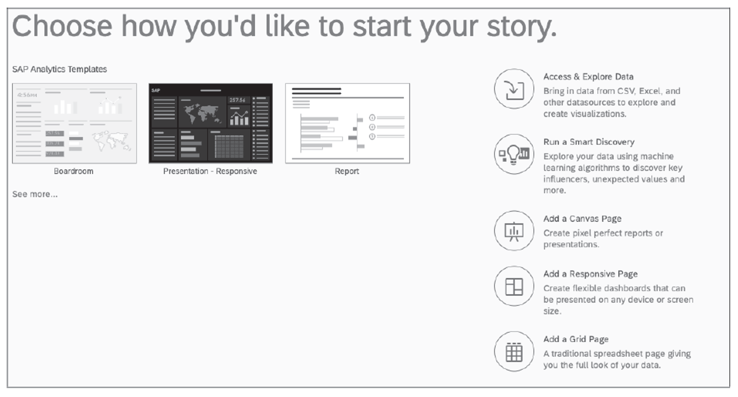
SAP Analytics Cloud supports a wide range of business scenarios across industries and departments. Below are some common use cases that highlight how organizations can leverage its core capabilities for greater insight and decision-making.
Drawing inspiration from its existing suite of BI solutions, SAP based SAP Analytics Cloud around four core functional areas: business intelligence, data visualization, planning, and the analytics designer.
The business intelligence area contains all SAP Analytics Cloud functionality, including data connectivity, data modeling, storytelling and reporting, collaboration, and data quality. Users performing business intelligence mainly focus on data acquisition (collecting data and feeding it into the system), data visualization (creating helpful reports with the data you’ve collected), and publication (releasing the reports you created so they can be used for decision making).
For even more data visualization, the SAP Analytics Cloud analytics designer contains tools that allow for the creation of complex analytical applications, including the extension of simpler reports with the help of scripting and other advanced functionality. Users creating these advanced applications (termed “dashboards”) are typically developers—those who know JavaScript and the syntax of applications created in SAP Lumira, designer edition would immediately know what’s going on in these applications.
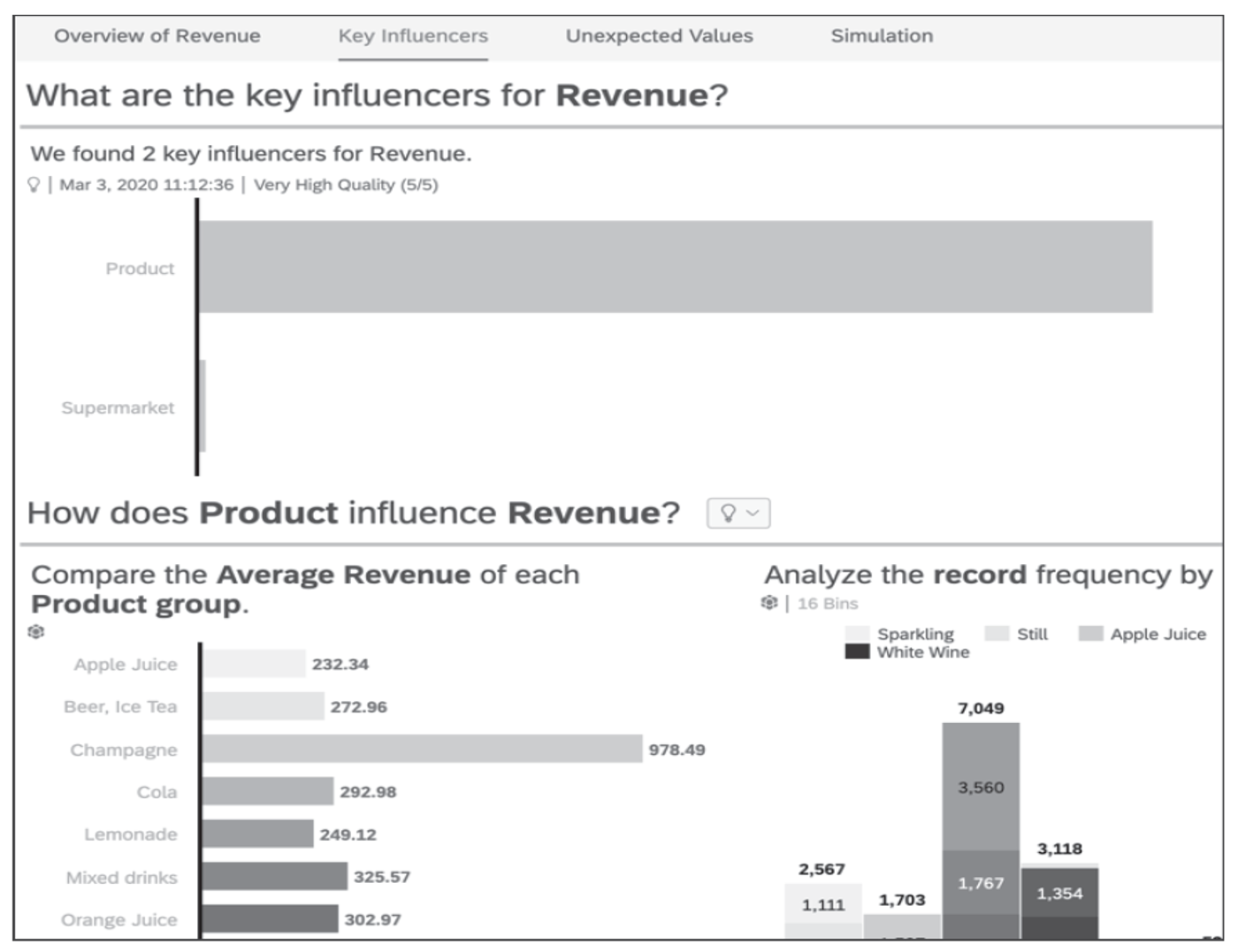
The planning area contains tools that focus on end-to-end business planning processes, including data model extension, formula application, and creation of charts like a value driver tree. Users performing planning are looking to use broad swaths of the data collected to create actionable plans for businesses to put into action in the future.
The predictive analytics area contains both manual and automated processes, such as determining what the key influencers are for a specific dimension, or utilizing machine learning to identify trends not visible to the human eye. Users performing predictive analysis are looking to decipher patterns and trends in the data collected to deduce what may happen in the future. This analysis can be extremely helpful when combined with the ideas from those doing planning.
Additionally, SAP Analytics Cloud is necessary to run four additional solutions used in unique cases.
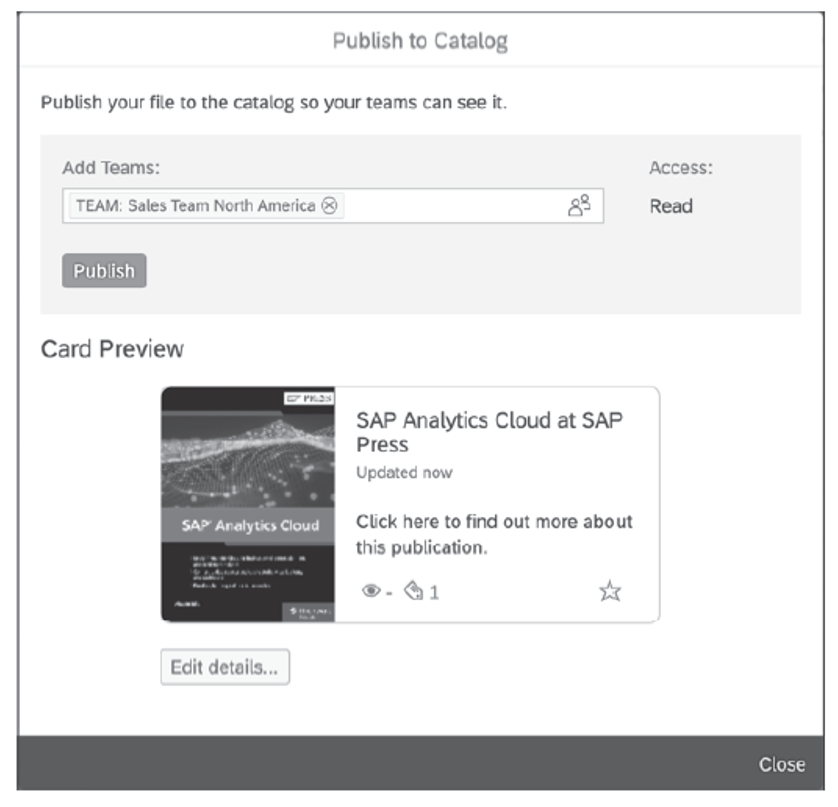
Introduced in 2020, the SAP Analytics Catalog serves as a repository of published reports for anyone in an organization to access. As reports are created and published in SAP Analytics Cloud, they are automatically added to the SAP Analytics Catalog.
The SAP Analytics Cloud mobile app is built directly on top of SAP Analytics Cloud and allows users to access stories and dashboards from their mobile device rather than desktop or laptop.
SAP Analytics Hub also serves as a repository of published reports, but only displays report metadata and requires curation by a user in order for reports to be included. Unlike the SAP Analytics Catalog, SAP Analytics Hub requires a dedicated license.
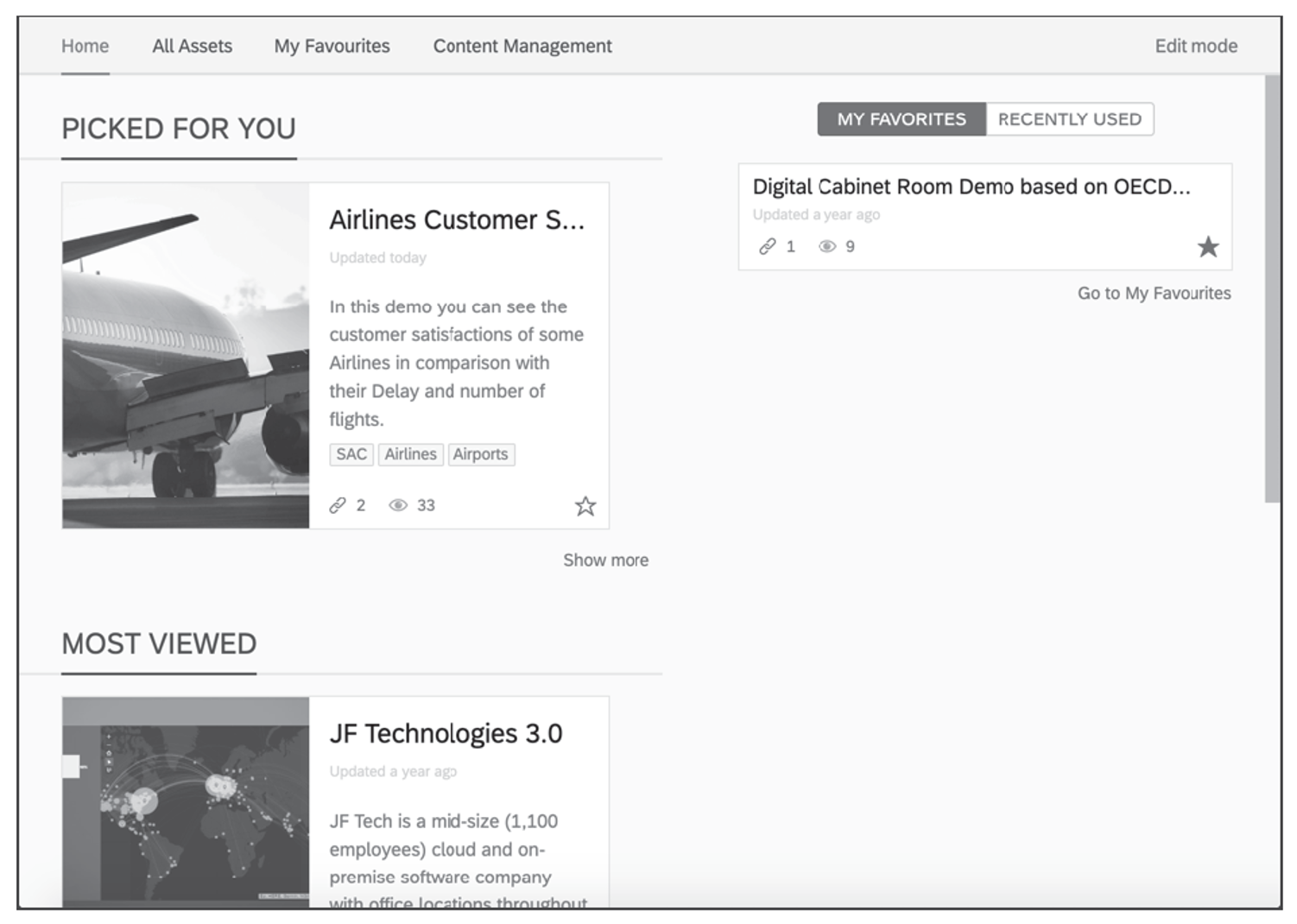
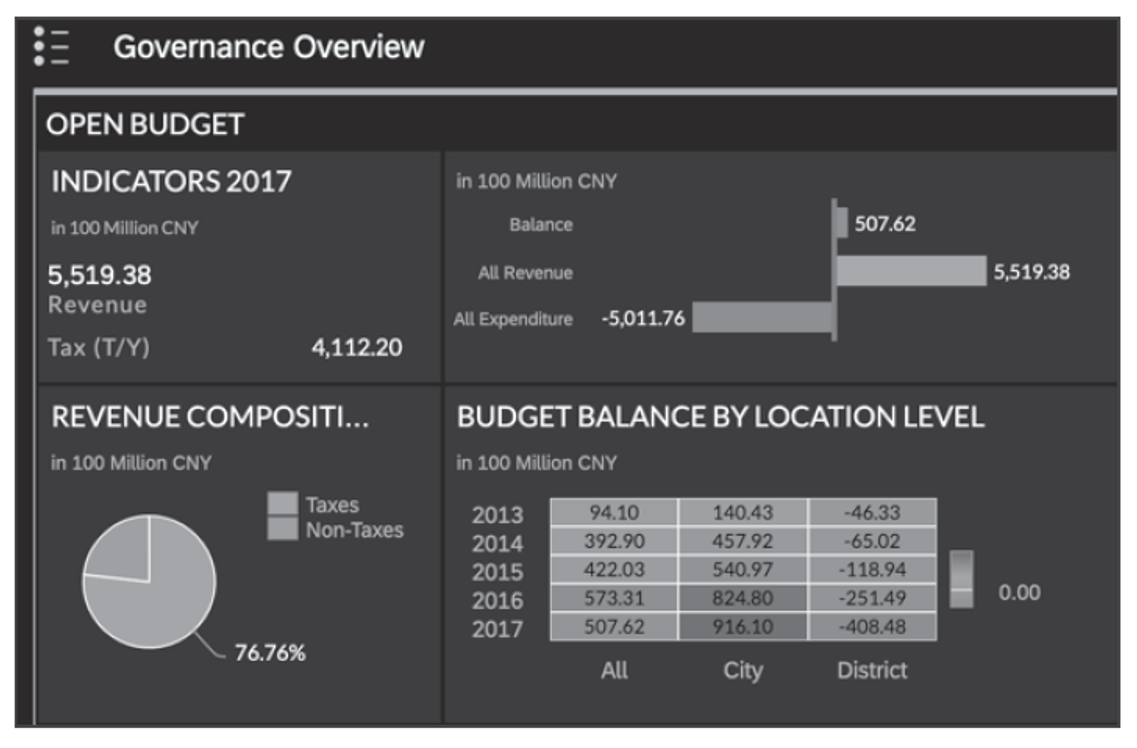
The SAP Digital Boardroom allows users to create an interactive, touch-based story with multiple reports—also known as dashboards. It is meant to simplify the presentation of various data into an easy-to-digest form.
For those not wanting to run their BI solely on the cloud, integration options exist so they can utilize SAP Analytics Cloud in addition to their existing on-premise system, creating a hybrid system. In this situation, sensitive company data can be kept on the on-premise side and not replicated into the cloud, ensuring that privacy and legal requirements are met. An option exists for replicating data, too, if desired.
As its name suggested, SAP Analytics Cloud is available via the cloud, meaning the solution is hosted and maintained by the vendor (SAP) and accessed by customers via a license. The cloud deployment model is beneficial in that it lowers administration and upkeep costs for the customer and allows them access to the latest updates as they are released.
Support is currently available for the Google Chrome and Microsoft Edge browsers.
SAP Analytics Cloud is available both as a standalone solution and as an embedded component within various SAP applications.
The standalone version offers the full breadth of SAP Analytics Cloud functionality, including business intelligence, planning, predictive analytics, and analytical application development. It supports integration with a wide variety of SAP and non-SAP data sources and includes access to advanced features like mobile applications, automated story export, and application development.
In contrast, the embedded version of SAP Analytics Cloud is included in SAP solutions such as SAP S/4HANA Cloud, SAP SuccessFactors People Analytics, SAP Marketing Cloud, and SAP Sales Cloud. This version helps users become familiar with SAP Analytics Cloud workflows but is limited in scope:
SAP also supports embedding SAP Analytics Cloud via iFrame technology, allowing customers to insert analytics content into other portals or custom applications to create a seamless workflow.
There’s no universal answer as to which version to choose. Consider the following when deciding:
Licensing: Do you have access to only the embedded version, or do you also hold licenses for the full standalone version?
Functionality Needs: Do you require connections to multiple data sources? Are you building advanced analytics apps or dashboards?
User Count and Scalability: Does the embedded version meet your organization’s size and usage demands?
Future Strategy: Will SAP Analytics Cloud become your company’s central analytics solution or simply support a single data source?
SAP updates the solution on two timeframes: for partner and nonproductive tenants, updates are provided on a biweekly basis. For those considered productive tenants, updates are rolled out quarterly.
Here are answers to some of the most common things SAP users want to know about SAP Analytics Cloud.
How does SAP Analytics Cloud connect to SAP S/4HANA?
SAP Analytics Cloud connects to SAP S/4HANA using either a live connection, which queries SAP S/4HANA data in real time without replicating it into SAP Analytics Cloud, or an import connection, which copies data into SAP Analytics Cloud for use in stories and models. Live connections are the recommended approach for SAP S/4HANA and SAP HANA integrations and require the SAP Analytics Cloud agent or a direct tunnel connection depending on the deployment.
How is Joule used in SAP Analytics Cloud?
Joule is SAP's AI copilot, and its integration with SAP Analytics Cloud allows business users to ask analytical questions in natural language and receive answers as charts and metrics without needing to navigate the SAP Analytics Cloud interface directly.
What is a live connection vs. an import connection in SAP Analytics Cloud?
A live connection queries data directly from the source system in real time, meaning data is never replicated into SAP Analytics Cloud and always reflects the current state of the source. An import connection copies data into SAP Analytics Cloud on a scheduled or manual basis, which can improve story performance but means the data may not reflect the latest changes in the source system.
What is Smart Predict in SAP Analytics Cloud?
Smart Predict is SAP Analytics Cloud's automated machine learning capability for building and applying predictive models. It supports time series forecasting, classification, and regression scenarios, and is designed for business users who need predictive insights without requiring data science expertise. Smart Predict models can be integrated directly into planning workflows and stories.
What is the difference between SAP Analytics Cloud stories and dashboards?
In SAP Analytics Cloud, a story is the primary content type used to create reports and data visualizations, combining charts, tables, and other widgets connected to one or more data models. Dashboards, created using the Analytics Designer tool, are more advanced analytical applications that incorporate scripting and custom interactivity for complex use cases. As of the 2023 unified story experience, SAP Analytics Cloud allows users to build both stories and analytics apps within the same interface.
In addition to the information laid out above, there are a handful of important terms related to SAP Analytics Cloud you should also know:
Getting Started with SAP Analytics Cloud
These posts introduce SAP Analytics Cloud for new users and administrators, covering the platform's core capabilities, key benefits, initial setup steps, the difference between standalone and embedded versions, and an overview of the SAP Digital Boardroom.
Planning
These posts cover business planning in SAP Analytics Cloud, including model selection, planning story best practices, and an overview of the core features available for financial and operational planning workflows.
Predictive Analytics
These posts cover predictive analytics in SAP Analytics Cloud, including the Smart Predict and Smart Assist services, time series forecasting, and a practical guide to implementing a predictive analytics project from start to finish.
Integration and Data Connectivity
These posts cover connecting SAP Analytics Cloud to SAP data sources, including SAP BW/4HANA enablement, live connection scenarios, and step-by-step guidance for building dashboards using SAP S/4HANA Cloud data.
Visualization and Storytelling
These posts cover data visualization and story creation in SAP Analytics Cloud, including dashboard design, SAP Fiori tile integration, story performance optimization, and how to share and publish completed stories.
Data Modeling and Configuration
These posts cover foundational configuration tasks in SAP Analytics Cloud, including setting up currency rate tables and creating and managing user accounts.
Learn more SAP from our official Learning Center.
And to continue learning even more about SAP Analytics Cloud, sign up for our weekly blog recap here: